Database observability is the ability to explain why a data platform behaved the way it did, from the evidence the platform already emits, without shipping new code to find out. Database monitoring tells us that p99 latency on the orders service crossed 400 ms. Observability tells us it was one query class, waiting on a lock, behind an autovacuum run that could not finish because a replica held back the xmin horizon. The first is a dashboard. The second is database observability doing its job: an answer.
Most estates we look at have plenty of monitoring and very little database observability. There are forty Grafana panels per cluster, alerts on CPU above 80 percent, and a Slack channel that nobody reads after the second week. When something breaks, the on-call engineer still opens psql, mysql or clickhouse-client and starts querying catalog tables by hand. That manual step is the gap between database monitoring and database observability, and it is what this post is about.
We cover relational engines, document and wide-column stores, key-value caches, column stores, NewSQL systems and the managed cloud services built on top of them. The engines differ. The database observability questions do not.
In this post
Monitoring versus database observability: where the line sits
Database monitoring is a set of known questions asked on a schedule: is the primary up, is replication lag under 30 seconds, is the disk under 85 percent full. It is necessary and it is cheap. Its weakness is that it only answers the questions somebody thought to ask before the incident.
Database observability starts from the other end. It assumes the next incident will be one nobody predicted, so it keeps enough high-resolution, correlatable evidence to ask new questions afterwards. In practice that means three things database monitoring alone rarely provides:
- Per-query-class telemetry, keyed by a stable fingerprint, rather than instance-wide averages.
- Time decomposition: how much of a slow statement was CPU, I/O, lock waits, network or queueing for admission.
- Join keys between the application, the engine and the host, so a trace span can lead to a wait profile and then to a disk queue.
None of this database observability work requires a particular vendor. Every serious engine already exposes the raw material in its own catalog or system tables. The work is in collecting it without hurting the database, storing it at the right cardinality and wiring it to decisions.
A database observability reference architecture
The diagram below is the shape we use on almost every estate, whatever the engine mix. Engine-native telemetry flows into a collection tier, a gateway collector enforces redaction and cardinality rules, and the signals land in three different stores because they have three different access patterns.
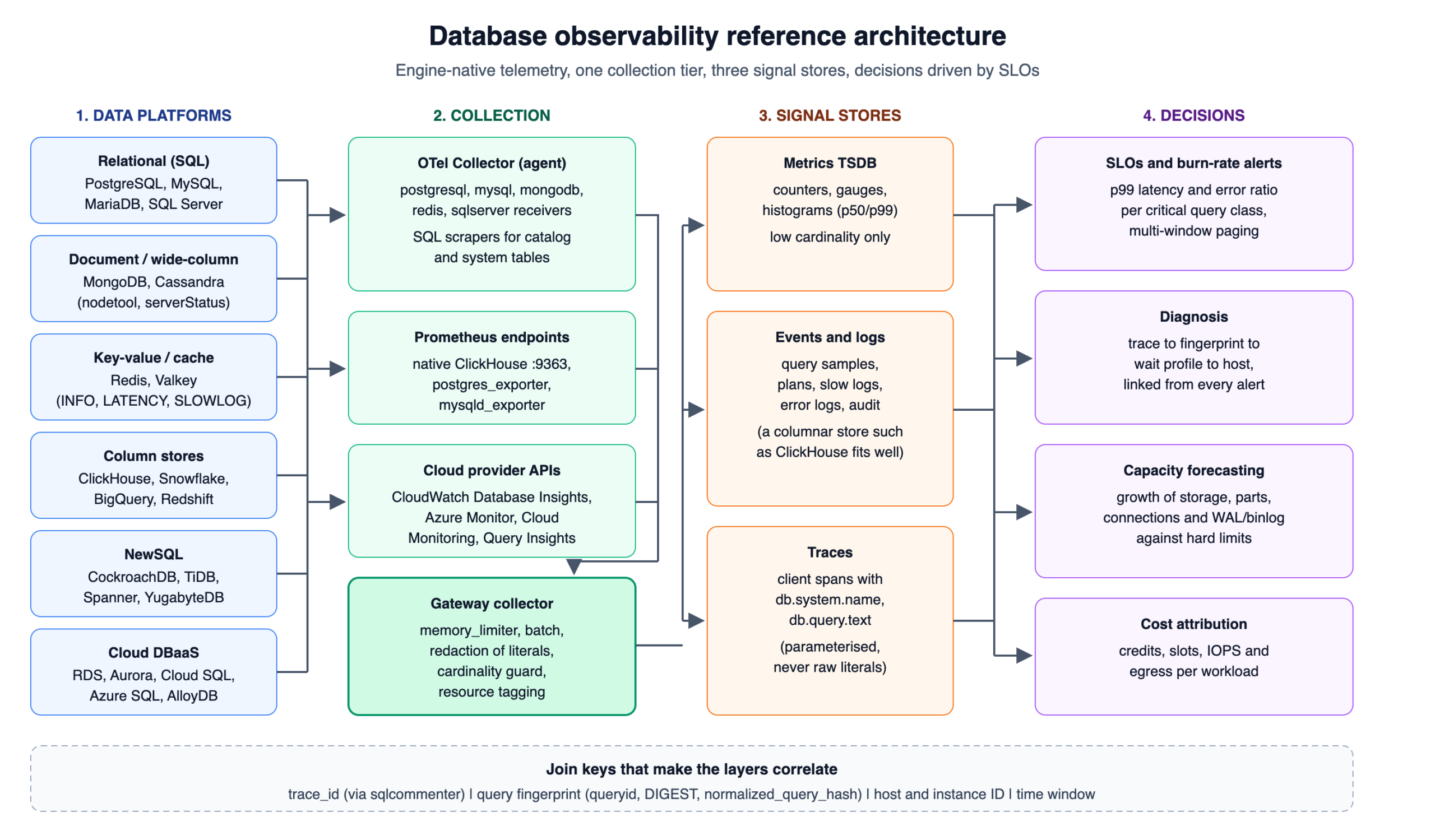
Two design choices in that picture matter more than the tool names.
First, the gateway collector is where policy lives. Literal values are stripped from query text there, labels that would explode cardinality are dropped there, and every signal is tagged with environment, cluster and instance identity there. If that policy is spread across fifty agents, it drifts within a quarter, and database observability quietly degrades with it.
Second, query samples, plans and slow-log events belong in an events store, not in the metrics TSDB. A Prometheus-style TSDB is excellent at a few hundred thousand active series and fragile at tens of millions. Query text is effectively unbounded. A columnar store such as ClickHouse handles that shape well, which is why a good number of teams now keep database observability events there and keep only aggregated counters in the TSDB.
Nine database observability signals that carry the diagnostic weight
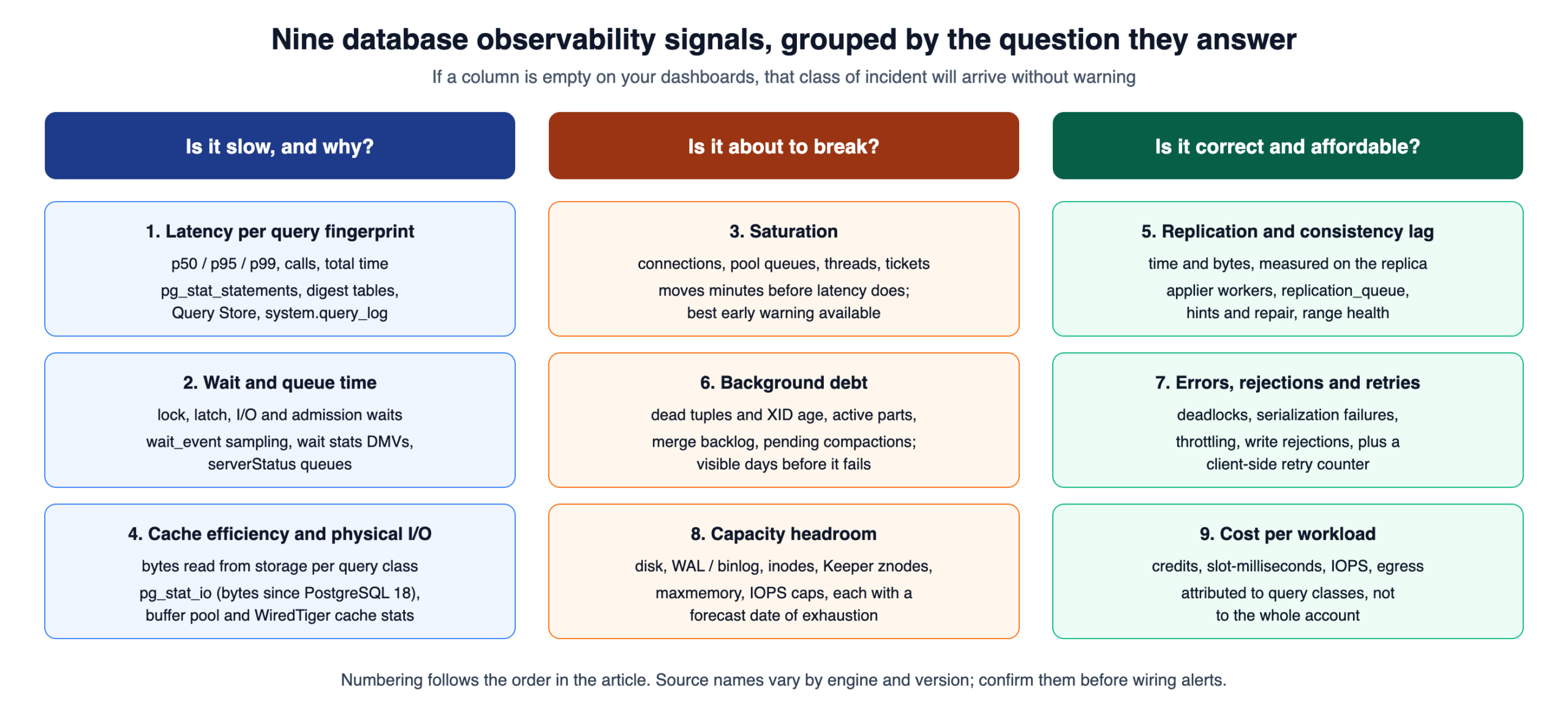
After enough incident reviews, a pattern holds across engines: a small number of signals explain the large majority of production problems. We group them into nine. Everything else is useful context, but if these nine are missing, database observability is incomplete no matter how many panels exist.
1. Latency distribution per query fingerprint
Instance-wide average latency hides almost everything. What we want is p50, p95 and p99 per normalised query class, plus call count and total time, so we can separate a query that is slow for everyone from one that is slow once an hour. Every mainstream engine keeps this data. PostgreSQL has pg_stat_statements, MySQL 8.0 and later keep percentiles in performance_schema, SQL Server has Query Store, and ClickHouse writes every finished query to system.query_log.
2. Wait and queue time
Latency without decomposition invites guesswork, and decomposition is where database observability earns its keep. PostgreSQL exposes wait_event_type and wait_event in pg_stat_activity (and a catalog of every wait event in pg_wait_events since PostgreSQL 17). MySQL records waits through performance_schema instruments. SQL Server has sys.dm_os_wait_stats and per-query waits in Query Store. MongoDB reports admission queueing through serverStatus. Sampling these every second or two, grouped by query fingerprint, is the single most useful habit in database observability.
3. Saturation of connections, threads and tickets
Most “the database is slow” pages are really queueing pages. Watch active versus maximum connections, pooler wait queues in PgBouncer or ProxySQL, Cassandra thread-pool pending and blocked counts in nodetool tpstats, and ClickHouse concurrent query limits. Saturation signals move minutes before latency does, which makes them the best early warnings we have.
4. Cache efficiency and physical I/O
Buffer pool hit ratios are a blunt instrument, but a sudden drop is a reliable symptom of a plan change, a new unindexed access path or a working set that outgrew memory. The better signal is bytes read from storage per query class. PostgreSQL 18 made this easier: pg_stat_io now reports read_bytes and write_bytes directly, includes WAL I/O, and per-backend I/O can be read with pg_stat_get_backend_io().
5. Replication and consistency lag
Measure lag in both time and bytes, and measure it from the replica’s point of view. On PostgreSQL that is pg_stat_replication on the primary plus replay timestamps on the standby. On MySQL, performance_schema.replication_applier_status_by_worker is far more informative than Seconds_Behind_Source. For ClickHouse, system.replication_queue shows stuck fetches and merges per replica. Cassandra needs hints and repair status rather than a single lag number. NewSQL systems expose raft or range health instead of classic lag.
6. Background debt: vacuum, merges and compaction
Every engine carries deferred work. In PostgreSQL it is dead tuples and the age of the oldest transaction ID, in ClickHouse it is active parts per partition and the merge backlog, in Cassandra and RocksDB-based systems it is pending compactions and SSTable counts. This debt is silent until it is not. Transaction ID wraparound, “too many parts” insert rejections and compaction storms are all visible days in advance if somebody graphs the debt.
7. Errors, rejections and retries
Count errors by class: deadlocks, serialization failures, lock timeouts, connection refusals, throttling responses from cloud services, and write rejections. Retries deserve their own counter on the client side, because a retry loop can hide a real failure while doubling load.
8. Capacity headroom against hard limits
Disk is the obvious one. Less obvious limits cause more outages: max_connections, WAL or binlog volume on disk, inode counts, ZooKeeper or ClickHouse Keeper znode counts, Redis maxmemory with an eviction policy that silently deletes keys, and cloud IOPS or throughput caps. Graph each limit with its current value and its forecast date of exhaustion.
9. Cost per workload
On consumption-priced platforms, cost is an operational signal. Snowflake credits per warehouse, BigQuery slot-milliseconds per job, provisioned IOPS on RDS and cross-zone egress all respond to the same query regressions that hurt latency. Attributing spend to query classes turns a finance conversation into an engineering one.
Collecting database observability signals engine by engine
The queries below are the starting points we use. Run them against a replica or staging instance first, check the privileges your monitoring role actually holds, and confirm the columns against your exact server version before you wire anything into a collector.
PostgreSQL
pg_stat_statements must be in shared_preload_libraries, which needs a restart. Enabling track_io_timing is a reload, but check the clock source cost with pg_test_timing first on virtualised hosts.
SELECT
    queryid,
    calls,
    ROUND(total_exec_time::NUMERIC, 1) AS total_ms,
    ROUND(mean_exec_time::NUMERIC, 2) AS mean_ms,
    shared_blks_read,
    temp_blks_written,
    wal_bytes
FROM pg_stat_statements
ORDER BY total_exec_time DESC
LIMIT 20;
For wait decomposition, sample active sessions and group by the query identifier, which pg_stat_activity exposes since PostgreSQL 14 when compute_query_id is on:
SELECT
    query_id,
    wait_event_type,
    wait_event,
    COUNT(*) AS sessions
FROM pg_stat_activity
WHERE state = 'active'
  AND backend_type = 'client backend'
GROUP BY query_id, wait_event_type, wait_event
ORDER BY sessions DESC;
Two honest caveats. pg_stat_statements evicts entries beyond pg_stat_statements.max (5000 by default), so a busy estate with many distinct statements loses its long tail. And queryid is not guaranteed to be stable across major versions or architectures, so do not treat it as a permanent key across an upgrade.
MySQL and MariaDB
The digest summary table is the MySQL equivalent, with percentile columns available since MySQL 8.0. Timer columns are in picoseconds.
SELECT
    DIGEST_TEXT,
    COUNT_STAR AS calls,
    ROUND(SUM_TIMER_WAIT / 1e12, 2) AS total_s,
    ROUND(QUANTILE_99 / 1e9, 2) AS p99_ms,
    SUM_ROWS_EXAMINED,
    SUM_ROWS_SENT,
    SUM_NO_INDEX_USED
FROM performance_schema.events_statements_summary_by_digest
ORDER BY SUM_TIMER_WAIT DESC
LIMIT 20;
A high ratio of SUM_ROWS_EXAMINED to SUM_ROWS_SENT is one of the cheapest indicators of a missing index. MariaDB’s performance_schema differs in places and is disabled by default, so verify the table and column set on MariaDB before reusing this query.
ClickHouse
ClickHouse is unusually generous with self-telemetry, which makes database observability on it cheaper than on most engines. The per-query view comes from system.query_log:
SELECT
    normalized_query_hash,
    any(query) AS sample_query,
    count() AS runs,
    quantile(0.99)(query_duration_ms) AS p99_ms,
    sum(read_bytes) AS bytes_read,
    max(memory_usage) AS peak_memory
FROM system.query_log
WHERE type = 'QueryFinish'
  AND event_date >= today() - 1
  AND event_time >= now() - INTERVAL 1 HOUR
GROUP BY normalized_query_hash
ORDER BY p99_ms DESC
LIMIT 20;
Background debt is visible in system.parts. Compare the result against parts_to_delay_insert and parts_to_throw_insert for the table, read from system.merge_tree_settings, because defaults have changed across releases:
SELECT
    database,
    table,
    partition_id,
    count() AS active_parts
FROM system.parts
WHERE active
GROUP BY database, table, partition_id
ORDER BY active_parts DESC
LIMIT 10;
For metrics, ClickHouse ships a native Prometheus endpoint, so no exporter process is needed. This is a server config change and requires a restart:
<clickhouse>
    <prometheus>
        <endpoint>/metrics</endpoint>
        <port>9363</port>
        <metrics>true</metrics>
        <events>true</events>
        <asynchronous_metrics>true</asynchronous_metrics>
    </prometheus>
</clickhouse>
Set a TTL on system.query_log and the other system log tables. Without one, they grow until they become a disk capacity incident of their own.
MongoDB
db.currentOp() with a duration filter finds long-running operations, the profiler and slow query log capture statement shapes, and serverStatus carries cache and admission data. From MongoDB 7.0, execution admission is reported under queues.execution rather than the older wiredTiger.concurrentTransactions section, so dashboards built on the old path go quiet after an upgrade.
db.currentOp({ active: true, secs_running: { $gte: 5 } })

const s = db.serverStatus();
printjson({
  cache_bytes: s.wiredTiger.cache["bytes currently in the cache"],
  cache_max: s.wiredTiger.cache["maximum bytes configured"],
  dirty_bytes: s.wiredTiger.cache["tracked dirty bytes in the cache"],
  execution_queues: s.queues ? s.queues.execution : "pre-7.0: see wiredTiger.concurrentTransactions"
});
Redis and Valkey
Redis and Valkey share the core diagnostic commands. The latency monitor is off until a threshold is set, and CONFIG SET is a runtime change that is lost on restart unless it is also written to the config file:
redis-cli -h ${REDIS_HOST} -a "${REDIS_PASSWORD}" CONFIG SET latency-monitor-threshold 100
redis-cli -h ${REDIS_HOST} -a "${REDIS_PASSWORD}" LATENCY DOCTOR
redis-cli -h ${REDIS_HOST} -a "${REDIS_PASSWORD}" SLOWLOG GET 25
redis-cli -h ${REDIS_HOST} -a "${REDIS_PASSWORD}" INFO commandstats
From INFO, the fields that matter most are evicted_keys, mem_fragmentation_ratio, connected_clients against maxclients, and rejected_connections. The keyspace hit ratio is useful, but an evicted_keys counter that starts climbing is the one that pages.
Cassandra
nodetool tpstats shows pending and blocked tasks per thread pool and, just as important, dropped message counts. Since Cassandra 4.0 the same data is queryable over CQL through the system_views virtual tables, which is easier to collect at scale than parsing nodetool output. nodetool tablehistograms gives partition size and SSTables-per-read percentiles, and a rising SSTables-per-read number is an early sign of compaction falling behind.
NewSQL and distributed SQL
Distributed SQL engines keep their own statement statistics: crdb_internal.statement_statistics in CockroachDB, information_schema.statements_summary in TiDB, and the SPANNER_SYS query statistics tables in Spanner. The extra signals here are range or region health, leaseholder or leader distribution, and transaction contention events, because distributed transactions fail in ways a single-node engine never does.
Cloud DBaaS and cloud warehouses
Managed services change who can see what, and that shapes database observability more than most teams expect. On AWS, Performance Insights reached end of life on 30 June 2026 and instances moved to CloudWatch Database Insights. The Standard mode keeps seven days of history and the Advanced mode keeps fifteen months, so teams that relied on longer Performance Insights retention should confirm which mode they are actually on. Cloud SQL and AlloyDB offer Query Insights, Azure SQL has Query Store plus Azure Monitor, and Snowflake and BigQuery expose query history through ACCOUNT_USAGE views and INFORMATION_SCHEMA.JOBS respectively. One trap: Snowflake’s ACCOUNT_USAGE.QUERY_HISTORY can lag by up to 45 minutes, which is fine for cost attribution and useless for paging.
Wiring it together with OpenTelemetry
OpenTelemetry is now the most practical vendor-neutral collection layer for database observability. The Collector’s contrib distribution ships receivers for PostgreSQL, MySQL, MongoDB, Redis and SQL Server, and it can scrape any Prometheus endpoint, including ClickHouse’s. The OpenTelemetry database semantic conventions were declared stable in semconv v1.33.0, which renamed several attributes (db.system became db.system.name, db.statement became db.query.text). Instrumentation libraries honour OTEL_SEMCONV_STABILITY_OPT_IN=database/dup to emit both forms during a migration, which avoids breaking existing dashboards overnight.
A trimmed agent configuration, with credentials read from the environment rather than written into the file:
receivers:
  postgresql:
    endpoint: pg-primary.internal:5432
    transport: tcp
    username: ${env:PG_MONITOR_USER}
    password: ${env:PG_MONITOR_PASSWORD}
    databases: [orders]
    collection_interval: 15s
    tls:
      insecure: false
      ca_file: /etc/otel/pg-ca.pem
  mysql:
    endpoint: mysql-primary.internal:3306
    username: ${env:MYSQL_MONITOR_USER}
    password: ${env:MYSQL_MONITOR_PASSWORD}
    collection_interval: 15s
  redis:
    endpoint: redis-01.internal:6379
    password: ${env:REDIS_PASSWORD}
    collection_interval: 10s
  prometheus/clickhouse:
    config:
      scrape_configs:
        - job_name: clickhouse
          scrape_interval: 15s
          static_configs:
            - targets: ["ch-01.internal:9363"]

processors:
  memory_limiter:
    check_interval: 1s
    limit_percentage: 80
    spike_limit_percentage: 20
  resource:
    attributes:
      - key: deployment.environment.name
        value: production
        action: upsert
  batch: {}

exporters:
  otlp:
    endpoint: otel-gateway.internal:4317

service:
  pipelines:
    metrics:
      receivers: [postgresql, mysql, redis, prometheus/clickhouse]
      processors: [memory_limiter, resource, batch]
      exporters: [otlp]
Receiver options change between Collector releases, so pin the Collector version and read the receiver’s README for that version before copying fields. The monitoring users should have read-only roles: pg_monitor on PostgreSQL, PROCESS plus SELECT on performance_schema on MySQL, and the clusterMonitor role on MongoDB.
Correlation: the database observability step most teams skip
Collecting signals is the easy half of database observability. The harder half is being able to walk from a slow user request to the disk that caused it, and that walk only works if every hop has a join key.
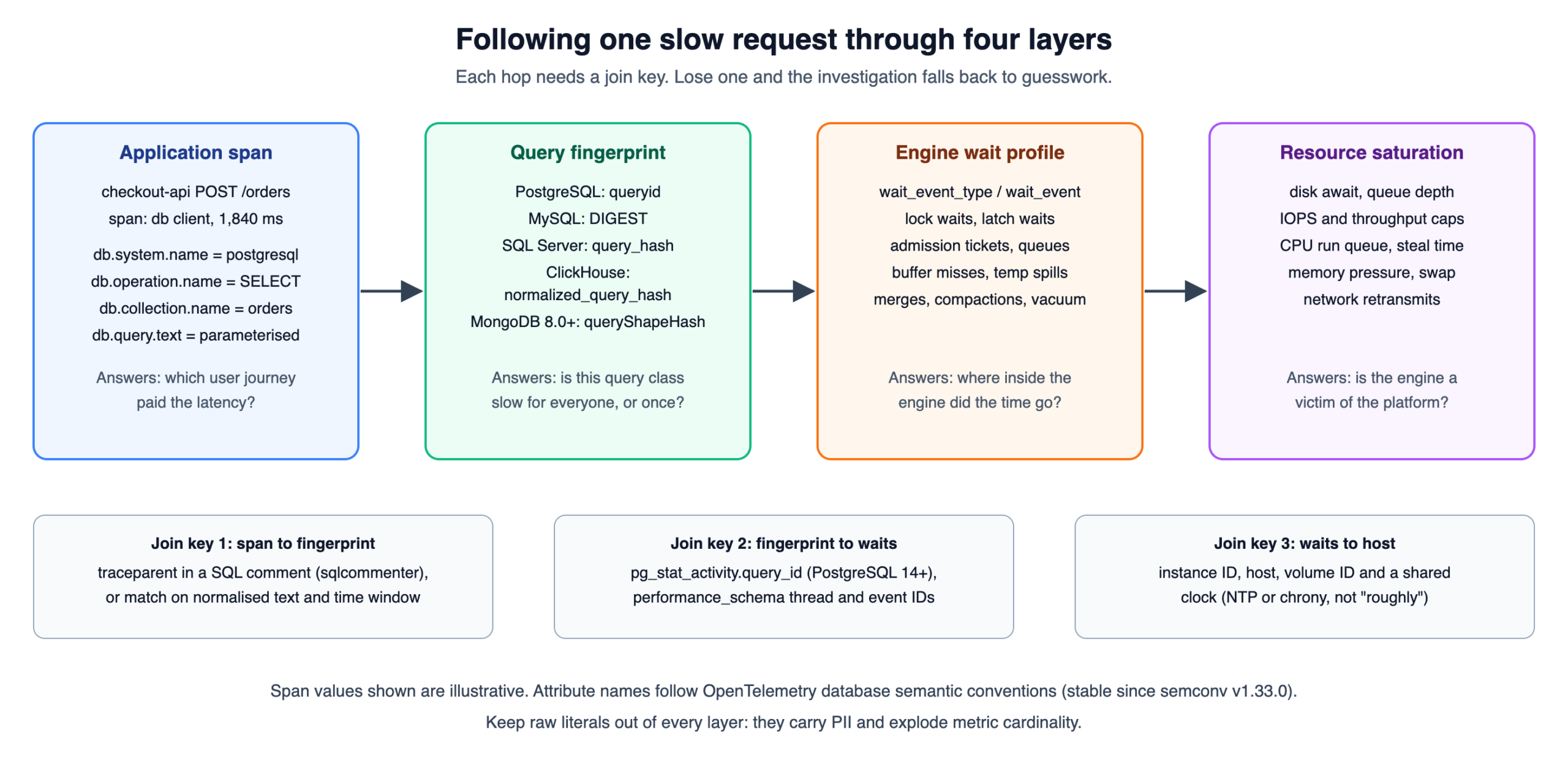
The first hop, from application span to query fingerprint, is where most stacks break. Two approaches work. sqlcommenter-style instrumentation appends the W3C traceparent to each statement as a SQL comment, so the trace ID reaches the engine’s logs. The cheaper option is matching on normalised query text within a narrow time window. Either way, the fingerprint must be computed consistently on both sides, which is why the query text in spans should be parameterised and never contain literals.
The last hop needs a shared clock. If database hosts and application hosts drift by a few hundred milliseconds, a correlation that looks causal can be pure coincidence. Chrony with a monitored offset is part of database observability, even though it rarely appears on anyone’s checklist.
Database observability SLOs that reflect what users feel
Alerting on CPU or on “replication lag above 30 seconds” produces pages that do not map to user impact. We prefer SLOs defined on the critical query classes: for example, 99 percent of checkout reads under 50 ms and 99.9 percent of writes succeeding, measured over 30 days. Those numbers are illustrative; the right targets come from the business, not from us.
Paging then follows burn rate rather than thresholds. The multi-window pattern from the Google SRE Workbook works well for databases: page when the one-hour burn rate exceeds 14.4 (which spends 2 percent of a 30-day budget in an hour) and the five-minute rate confirms it is still happening. Slower burns go to a ticket queue, not a phone. The result is fewer pages, and the pages that do fire are ones an engineer can act on.
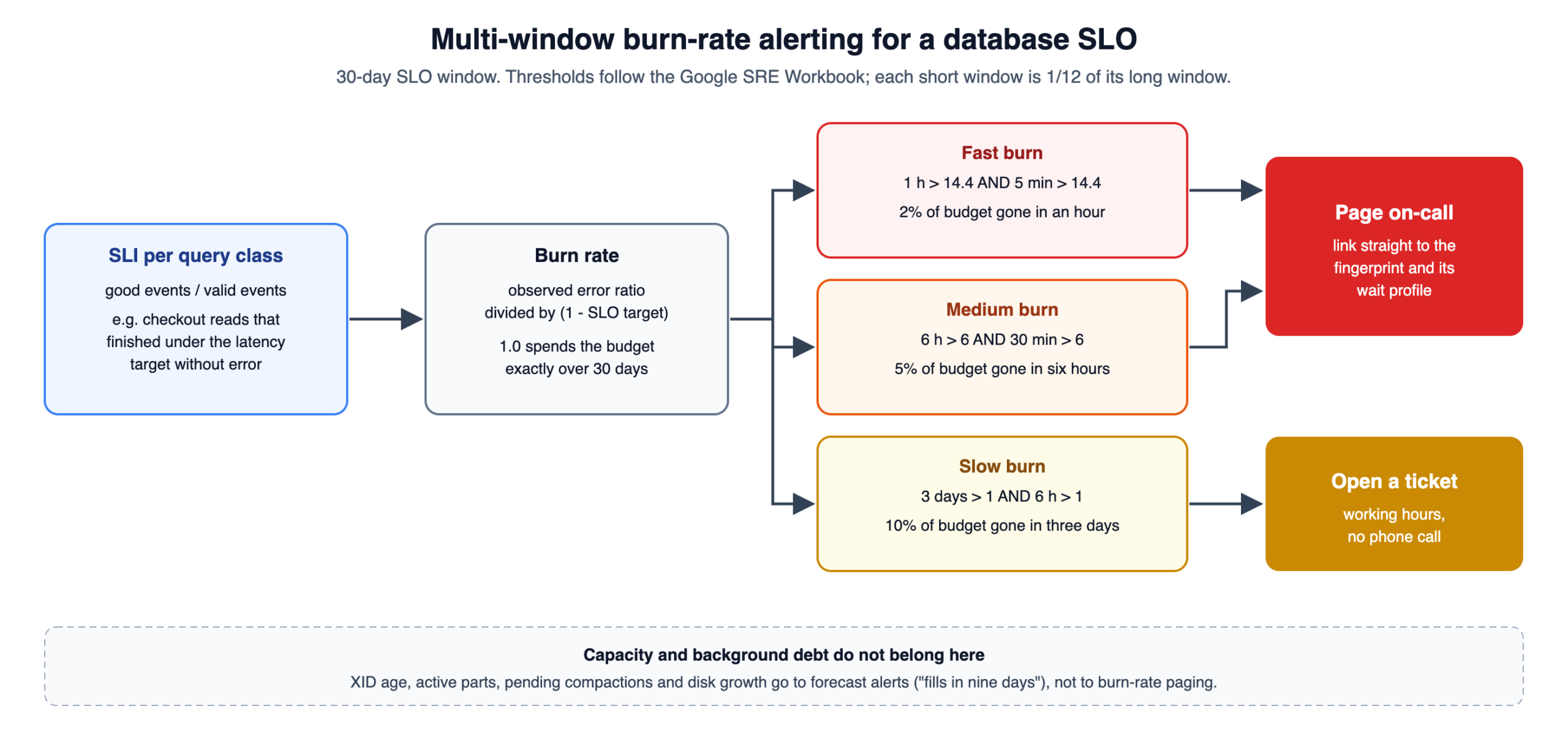
Capacity and background-debt signals do not fit SLOs well. Those belong on forecast alerts: “at the current rate, this volume fills in nine days” or “oldest transaction ID age will cross the autovacuum freeze threshold within 48 hours”. A forecast alert gives a team working hours to respond instead of a 3 a.m. page.
A quick map of where each signal lives
| Platform | Latency per fingerprint | Wait / queue time | Replication or lag | Background debt / cost |
|---|---|---|---|---|
| Relational: PostgreSQL | pg_stat_statements | pg_stat_activity sampling | pg_stat_replication | dead tuples, XID age |
| Relational: MySQL / MariaDB | statement digest summary | performance_schema waits | applier status by worker | InnoDB history list length |
| Relational: SQL Server | Query Store | sys.dm_os_wait_stats | Availability Group DMVs | version store, log reuse wait |
| Document: MongoDB | profiler, slow query log | serverStatus queues | rs.status() optimes | WiredTiger dirty cache |
| Wide-column: Cassandra | tablehistograms | tpstats, system_views | hints, repair status | pending compactions |
| Key-value: Redis / Valkey | SLOWLOG, commandstats | LATENCY DOCTOR | INFO replication offsets | evicted_keys, fragmentation |
| Column store: ClickHouse | system.query_log | processes, trace_log | replication_queue | parts, merges |
| NewSQL: CockroachDB / TiDB | statement statistics tables | contention events | range and region health | compaction and LSM health |
| Warehouse: Snowflake / BigQuery | query history and JOBS views | queued time columns | not applicable | credits, slot-milliseconds |
Database observability mistakes we see repeatedly
Putting raw query text or user IDs into metric labels. It feels useful for a week, then the TSDB runs out of memory and takes every dashboard down with it. Keep fingerprints in metrics and full text in the events store.
Collecting every database observability signal at one-second resolution. Wait sampling earns high resolution; table sizes do not. Match the interval to how fast the signal changes and the cost of scraping it. Some catalog queries are expensive on large schemas, so time the scrape itself and alert when it gets slow.
Treating the monitoring stack as less critical than the database. If the database observability pipeline shares disks, network or a Kubernetes node pool with production databases, it will fail during the incident it exists to explain. Give it its own failure domain and its own SLO.
Forgetting that managed services hide the host from database monitoring. On RDS, Cloud SQL or Azure SQL, OS-level metrics come from the provider at the provider’s resolution. Plan diagnosis around what the provider actually exposes, and check the retention tier before an incident rather than during one.
Relying on a single vendor’s agent for the whole estate. Engine-specific tools are often excellent, and we use them. But database observability that depends on one proprietary agent makes switching engines, clouds or vendors far harder than it needs to be. OpenTelemetry at the edge keeps that option open.
Where to start next week
If this is a lot at once, start database observability small. Pick the three query classes that matter most to revenue, give each one a latency SLO, and make sure an engineer can go from a burn-rate alert to the wait profile of that query class in under five minutes. That single path, working end to end, is worth more than a hundred database monitoring panels. Then add the background-debt forecasts, because those prevent the outages that are hardest to recover from.
Everything here should be tested on your own workload and versions before it reaches production, and changes to monitoring roles, preload libraries or server configs should go through the same change control as any other production change. Keep a restore and failover path you have actually rehearsed; database observability explains an incident, it does not undo one.
These are the conversations we have in the fsyncDATA Circle with the leaders who run data platforms inside India’s Global Capability Centers. If that describes your role, read what the fsyncDATA GCC programme offers, or see how a Circle seat is filled.
References
- PostgreSQL documentation: The Cumulative Statistics System
- PostgreSQL documentation: pg_stat_statements
- MySQL 8.4 Reference Manual: Statement Summary Tables
- ClickHouse documentation: system.query_log
- OpenTelemetry: Database semantic convention stability migration guide
- AWS documentation: CloudWatch Database Insights
- Google SRE Workbook: Alerting on SLOs